Welcome to MoneyOrc Developer's Portal!
WARNING: This section is under construction and may change without notice.
1. General Notes
All API calls are structured as HTTP requests to https://api.moneyorc.com/{version}/{command}[?parameters], with JSON body as a response.
Each response contains a minimum of 3 elements: "code", "message", and "api".
Example response:
HTTP/1.1 200 OK
Content-Type: application/json

{
  "code": 0,
  "message": "OK",
  "api": {
    "level": 1,
    "version": 1,
    "calls": 54,
    "calls_max": 1000,
    "reset": 80106
  }
  . . . . .
}
Response structure:
| Variable | Type | Meaning |
|---|
| code | Integer | Error code. Any value other than 0 (zero) indicates a problem. The code is command-specific |
| message | String | Human-readable error description |
| api | Object | Structure with API version and usage limits |
| api.level | Integer | API build number |
| api.version | Integer | API version class. Any API extensions within version class remain backwards compatible |
| api.calls | Integer | Amount of API calls made before reset (per access key) |
| api.calls_max | Integer | Maximum amount of API calls that can be made before reset (per access key) |
| api.reset | Integer | Time (seconds) before "api.calls" resets to zero |
1.1. Obtaining API Access Key
All API calls require access key that provides access to the child account with certain permission level. In order to obtain the Access Key, login as parent from the following location:
https://auth.moneyorc.com/login
Navigate to the child tab and click "API Access" button:
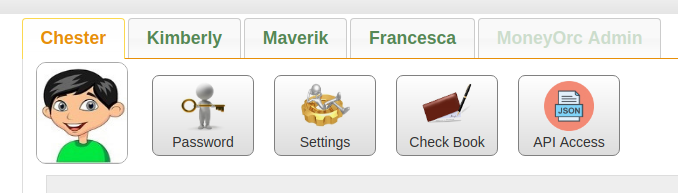
Click "Create API Key" to create a key for this child account. Note that you can create multiple keys for different applications and/or with different access permissions.
1.2. Authentication
Authentication is based on the Access Key. The key can be passed in one of the following methods.
a. Part of HTTP "Authorization" header. This method is preferred and should be used for production.
Example command:
curl -H 'Authorization: key={AccessKey}' https://api.moneyorc.com/v1/balance
Request:
GET /v1/balance HTTP/1.1
Authorization: key={AccessKey}
Response:
HTTP/1.1 200 OK
Content-Type: application/json

{
  "code": 0,
  "message": "OK",
  "api": {
    "level": 1,
    "version": 1,
    "calls": 54,
    "calls_max": 1000,
    "reset": 80106
  },
  "data": {
    "balance": {
      "total": 398.72,
      "cash": 298.72,
      "funds": 100,
      "invested": 0
    }
  }
}
b. HTTP GET parameter. Access Key can be passed as "access_key" variable in the GET request. While useful for development and debugging, this method is not recommended for production.
Example command:
curl https://api.moneyorc.com/v1/balance?access_key={AccessKey}
Request:
GET /v1/balance?access_key={AccessKey} HTTP/1.1
Response:
HTTP/1.1 200 OK
Content-Type: application/json

{
  "code": 0,
  "message": "OK",
  "api": {
    "level": 1,
    "version": 1,
    "calls": 54,
    "calls_max": 1000,
    "reset": 80106
  },
  "data": {
    "balance": {
      "total": 398.72,
      "cash": 298.72,
      "funds": 100,
      "invested": 0
    }
  }
}
In case there is a problem with Access Key, HTTP status code is set to value other than 200 and one of the following error codes is returned:
| Code | HTTP Code | Message | Meaning |
|---|
| 255 | 500 | Internal error | Cloud service is temporarily inaccessible. Try again later |
| 254 | 401 | Missing access key | Access Key was not provided or was not recognized as access key |
| 253 | 401 | Invalid access key | Provided Access Key is not valid or was removed |
| 252 | 429 | You have exceeded your request quota for this access key | Too many API calls within time window. Wait until reset |
| 251 | 401 | Invalid access key | Provided Access Key is not valid or was removed |
| 250 | 401 | Invalid access key | Provided Access Key is not valid or was removed |
| 249 | 403 | Permission denied | Provided Access Key was not granted permissions to access requested objects |
Example error response:
HTTP/1.1 403 Forbidden
Content-Type: application/json

{
  "code": 249,
  "message": "Permission denied",
  "api": {
    "level": 1,
    "version": 1,
    "calls": 119,
    "calls_max": 1000,
    "reset": 25253
  }
}
1.3. Usage Limits
Each Access Key is subject to usage limits. Default value is 1,000 calls per 24-hour period.
2. Commands
2.1. Check Account Balance
Use "balance" command to request account balance.
Example command:
curl -H 'Authorization: key={AccessKey}' https://api.moneyorc.com/v1/balance
Request:
GET /v1/balance HTTP/1.1
Authorization: key={AccessKey}
Response:
HTTP/1.1 200 OK
Content-Type: application/json

{
  "code": 0,
  "message": "OK",
  "api": {
    "level": 1,
    "version": 1,
    "calls": 54,
    "calls_max": 1000,
    "reset": 80106
  },
  "data": {
    "balance": {
      "total": 398.72,
      "cash": 298.72,
      "funds": 100,
      "invested": 0
    }
  }
}
Response structure:
| Variable | Type | Meaning |
|---|
| data | Object | Response object |
| data.balance | Object | Child account balance |
| data.balance.total | Number | Total child's account value |
| data.balance.cash | Number | Available cash |
| data.balance.funds | Number | Total money in funds |
| data.balance.invested | Number | Total invested money |
Error codes: none. (See Access Key Errors).
2.2. Get Active Job List
Use "jobs" command to obtain the list of active jobs.
Example command:
curl -H 'Authorization: key={AccessKey}' https://api.moneyorc.com/v1/jobs
Request:
GET /v1/jobs HTTP/1.1
Authorization: key={AccessKey}
Response:
HTTP/1.1 200 OK
Content-Type: application/json

{
  "code": 0,
  "message": "OK",
  "api": {
    "level": 1,
    "version": 1,
    "calls": 70,
    "calls_max": 1000,
    "reset": 71809
  },
  "data": {
    "jobs": [
      {
        "job_id": 8473,
        "name": "Dog Walk",
        "state": "open",
        "deadline": "2021-06-30",
        "time_left": 1331290
      },
      {
        "job_id": 8446,
        "name": "Car Wash",
        "state": "open",
        "deadline": "2021-06-30",
        "time_left": 1331290
      }
    ]
  }
}
Response structure:
| Variable | Type | Meaning |
|---|
| data | Object | Response object |
| data.jobs | Object | Array of open jobs |
| data.jobs[].job_id | Integer | Unique ID of the job. The combination of Access Key and Job ID is universally unique and is never reused. The value never changes, and is safe to cache |
| data.jobs[].name | String | Short name of the job |
| data.jobs[].state | String | Job state. Possible values are:- "open": the job is not completed
- "waiting": the job was submitted for parental approval and is not approved yet
|
| data.jobs[].deadline | Date | Deadline of the job. Format: "yyyy-mm-dd" |
| data.jobs[].time_left | Number | Amount of seconds until the deadline of this job |
Error codes: none. (See Access Key Errors).
2.3. Get Chore List
Use "chores" command to obtain the list of configured chores.
Example command:
curl -H 'Authorization: key={AccessKey}' https://api.moneyorc.com/v1/chores
Request:
GET /v1/chores HTTP/1.1
Authorization: key={AccessKey}
Response:
HTTP/1.1 200 OK
Content-Type: application/json

{
  "code": 0,
  "message": "OK",
  "api": {
    "level": 1,
    "version": 1,
    "calls": 71,
    "calls_max": 1000,
    "reset": 70959
  },
  "data": {
    "chores": [
      {
        "chore_id": 12446,
        "name": "Garbage",
        "freq": 1,
        "days": { "sun": true, "tue": true, "wed": true, "fri": true }
      },
      {
        "chore_id": 12672,
        "name": "Pet Care",
        "freq": 2,
        "days": { "sun": true, "mon": true, "tue": true, "wed": true, "thu": true, "fri": true }
      }
    ]
  }
}
Response structure:
| Variable | Type | Meaning |
|---|
| data | Object | Response object |
| data.chores | Array | Array of configured chores |
| data.chores[].chore_id | Integer | Unique ID of the chore. The combination of Access Key and Chore ID is universally unique and is never reused. The value never changes, and is safe to cache |
| data.chores[].name | String | Short name of the chore |
| data.chores[].freq | Integer | Weekly frequency. "1" means this chore must be completed every week, "2" means every other week and so on |
| data.chores[].days | Object | Chore schedule during the week |
| data.chores[].days.sun | Boolean | If set and true, the chore needs to be completed on or by Sunday |
| data.chores[].days.mon | Boolean | If set and true, the chore needs to be completed on or by Monday |
| data.chores[].days.tue | Boolean | If set and true, the chore needs to be completed on or by Tuesday |
| data.chores[].days.wed | Boolean | If set and true, the chore needs to be completed on or by Wednesday |
| data.chores[].days.thu | Boolean | If set and true, the chore needs to be completed on or by Thursday |
| data.chores[].days.fri | Boolean | If set and true, the chore needs to be completed on or by Friday |
| data.chores[].days.sat | Boolean | If set and true, the chore needs to be completed on or by Saturday |
Error codes: none. (See Access Key Errors).
2.4. Get Chore Card
Use "chore_cards" command to obtain the chore card. "offset" parameter allows to access chore cards for passed weeks. The value "0" retrieves chore card for the current week, "-1" is last week, "-2" is from two weeks ago and so on. "offset" is optional and default value is "0" (current week).
Example command:
curl -H 'Authorization: key={AccessKey}' https://api.moneyorc.com/v1/chore_cards?offset=-1
Request:
GET /v1/chore_cards?offset=-1 HTTP/1.1
Authorization: key={AccessKey}
Response:
HTTP/1.1 200 OK
Content-Type: application/json

{
  "code": 0,
  "message": "OK",
  "api": {
    "level": 1,
    "version": 1,
    "calls": 74,
    "calls_max": 1000,
    "reset": 70190
  },
  "data": {
    "chore_card": {
      "week_offset": 0,
      "state": "open",
      "created": "2021-06-12",
      "chores": {
        "sun": [ { "chore_id": 12446, "state": 1 },
                 { "chore_id": 12672, "state": 2 } ],
        "mon": [ { "chore_id": 12672, "state": 1 } ],
        "tue": [ { "chore_id": 12446, "state": 1 },
                 { "chore_id": 12672, "state": 1 } ],
        "wed": [ { "chore_id": 12446, "state": 0 },
                 { "chore_id": 12672, "state": 0 } ],
        "thu": [ { "chore_id": 12672, "state": 0 } ],
        "fri": [ { "chore_id": 12446, "state": 0 },
                 { "chore_id": 12672, "state": 0 } ],
        "sat": [ { "chore_id": 14370, "state": 0 } ]
      }
    }
  }
}
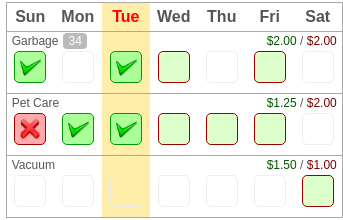
The above example represents the following chore card:
Response structure:
| Variable | Type | Meaning |
|---|
| data | Object | Response object |
| data.chore_card | Object | Chore card object |
| data.chore_card.week_offset | Integer | |
| data.chore_card.state | String | The state of the chore card. Possible values are:
- "open": the chore card is open for modifications and was not submitted for parental approval
- "waiting": the chore card was submitted for parental approval, but not closed yet
- "approved": the chore card was approved and is now closed
- "declined": the chore card was declined and is now closed
|
| data.chore_card.created | Date | Created date. Format: yyyy-mm-dd |
| data.chore_card.chores | Object | Chore schedule during the week |
data.chore_card.chores.sun
data.chore_card.chores.mon
. . . . . .
data.chore_card.chores.sat | Array | Array of objects that consist of chore ID and state for the given day. chore_id corresponds to the the response of "chores" command, and "state" is one of the following integer values:
- 0: the chore was not marked off for this day
- 1: the chore was marked as completed
- 2: the chore was marked as missed and is locked by the parent
|
In addition to Access Key Errors, the following error code may be returned:
| Code | Message | Meaning |
|---|
| 1 | Chore card does not exist | The chore card for this week was not created, or was removed. |
2.5. Get Score
Use "score" command to retrieve account score.
Example command:
curl -H 'Authorization: key={AccessKey}' https://api.moneyorc.com/v1/score
Request:
GET /v1/score HTTP/1.1
Authorization: key={AccessKey}
Response:
HTTP/1.1 200 OK
Content-Type: application/json

{
  "code": 0,
  "message": "OK",
  "api": {
    "level": 1,
    "version": 1,
    "calls": 74,
    "calls_max": 1000,
    "reset": 70190
  },
  "data": {
    "score": 762
  }
}
Response structure:
| Variable | Type | Meaning |
|---|
| data | Object | Response object |
| data.score | Integer | Score value |
Error codes: none. (See Access Key Errors).
3. Development
Among the boatload of tools available for development, "jq" remains the command-line choice of MoneyOrc API development team. Being part of standard repositories:
sudo apt install jq
it gives the quick and easy-to-script way to perform wide variety of functions. Here is an example of how to check the status of all chores for Tuesday:
curl -s -H 'Authorization: key={access_key}' https://api.moneyorc.com/v1/chore_cards | jq '.data.chore_card.chores.tue[].state'
The output produced:
0
0
0
1
1
2
1
3.2. Support
Please email to api@moneyorc.com for questions and ideas.